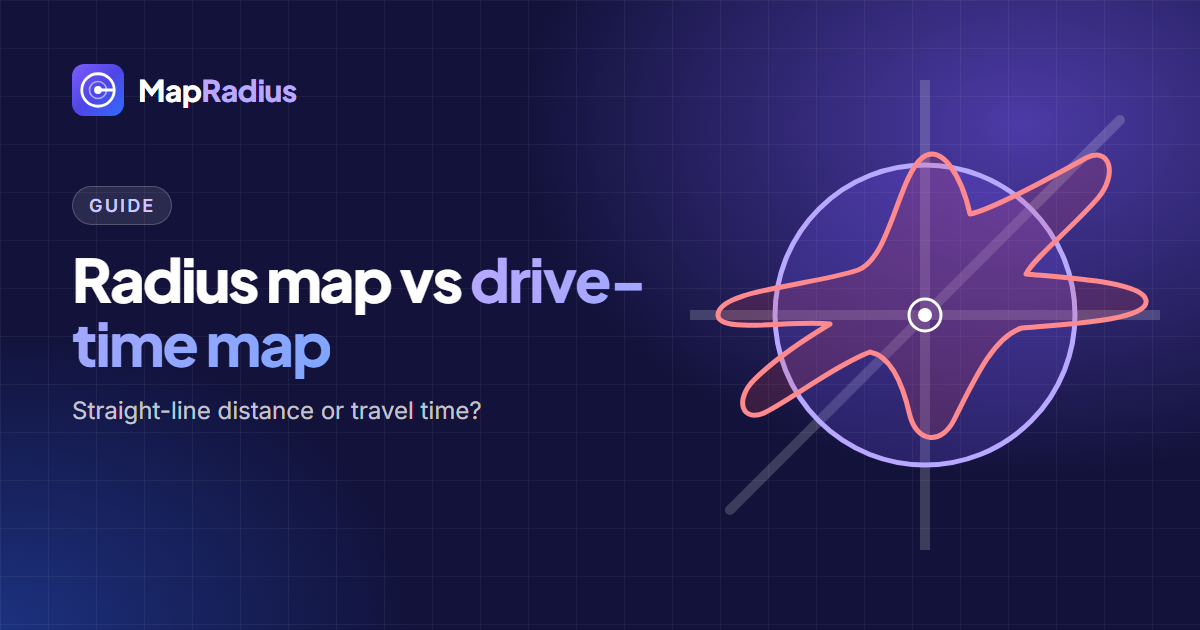
A radius map shows every place within a straight-line distance of a point. A drive-time map shows every place you can reach by road in a set time. Both start from one centre, and they answer 2 different questions.
What a radius map measures
A radius map draws a circle. Every point on its edge sits the same distance from the centre: a 10-mile radius reaches 10 miles (16.09 km) in every direction and covers about 314 square miles (814 km²). Roads, rivers and traffic don’t change the shape.
That makes a radius map fast, predictable and the same everywhere on Earth. You can draw one in seconds, share it as a link, and compare circles around different places fairly.
What a drive-time map measures
A drive-time map, also known as an isochrone, follows the road network. A 15-minute drive-time area stretches along motorways and highways, shrinks in slow city centres, and stops at rivers without bridges. The result is an uneven shape that changes with the time of day.
Drive-time maps need road data and a routing engine. GIS platforms such as ArcGIS, with its service area analysis, and business mapping tools such as Maptive build them.
When a radius map is the right choice
Use a radius map for 5 common jobs:
- Delivery zones priced by distance. Many couriers and restaurants price by miles from the kitchen.
- Google Business Profile service areas. Google wants place names, and a radius lists them quickly. See how to choose service areas with a radius map.
- Comparing locations. Equal circles around 3 possible sites show which one reaches more towns.
- Rules written in distance. School catchments, drone flight limits and planning notices are often set in metres or miles.
- Quick checks. “Is this address within 5 miles of the office?” takes one test point.
When a drive-time map is the right choice
Use a drive-time map when travel time drives the decision: emergency response targets, commute limits for staff, or a promise such as “delivery within 30 minutes”. In hilly areas, coastlines and cities split by a river, travel time and straight-line distance can differ a lot.
Using both together
Many teams start with a radius and refine with drive time. Draw a radius to see the general reach and list the places inside it. Then check the far edge of the circle with a routing app to see whether those places are realistic by road.
Try it
The Map Radius Tool draws geodesic radius circles, measured with the haversine formula, in miles, kilometers, meters, feet or nautical miles, lists the places inside them, and exports to CSV, KML and GeoJSON for your GIS.